
Articles / LLMs & Agents
Human-in-the-Loop with LangGraph: Interrupt and Resume in Python
Pause a LangGraph workflow for human approval in Python. Resume by thread ID, validate the decision, and keep rejected edits out of the final state.

A catalog agent proposes changing “Steel travel mug” to “350 ml stainless steel travel mug.” A reviewer needs to see both versions and decide whether to use the draft. They might open the request hours later. In the meantime, the workflow needs to preserve the proposal and the original description, and a refusal should leave the original in place.
The LangGraph data analysis agent calls tools as part of its reasoning loop. Here, the interesting boundary comes after the agent has proposed an action. In LangGraph, interrupt() hands control back to the caller with a review payload. A checkpointer keeps the graph state, and the next call uses Command(resume=...) with the same thread ID to deliver the decision.
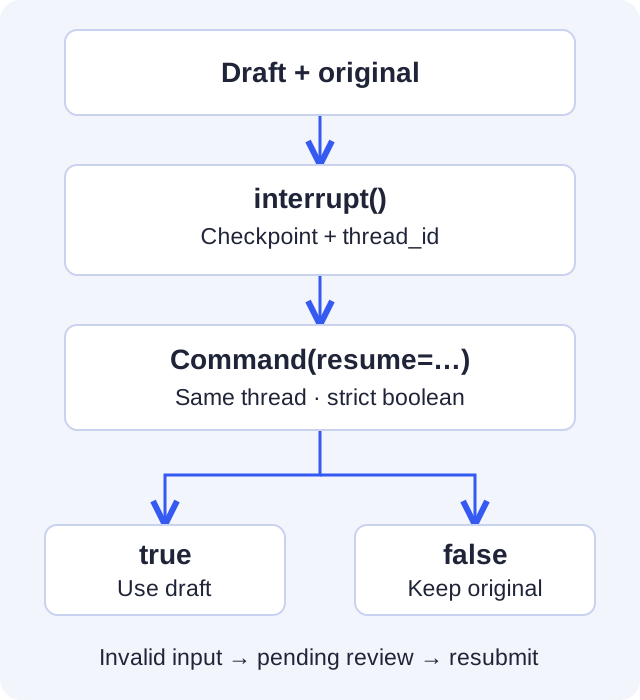
Pause with the exact proposal the reviewer will see
Use Python 3.11 and a virtual environment. This example was tested with LangGraph 1.2.20 and Pydantic 2.14.3. It takes a fixed proposal as input and updates only graph state, so it runs locally without a model, API key, or catalog connection.
python -m pip install "langgraph==1.2.20" "pydantic==2.14.3"
The state keeps the draft separate from the current description. The review node constructs its payload from that saved state. Its response schema requires a Boolean field called approved. Python treats any nonempty string as truthy, including "false", and Pydantic's plain bool accepts some coerced inputs. StrictBool restricts the decision to actual Booleans. LangGraph interrupt response schemas · Pydantic strict types
from typing import Literal, TypedDict

from langgraph.checkpoint.memory import InMemorySaver
from langgraph.graph import END, START, StateGraph
from langgraph.types import Command, interrupt
from pydantic import BaseModel, StrictBool


class CatalogEdit(TypedDict):
    product_id: str
    description: str
    draft: str
    status: Literal["pending", "approved", "rejected"]


class Decision(BaseModel):
    approved: StrictBool


def review(state: CatalogEdit):
    decision = interrupt(
        {
            "product_id": state["product_id"],
            "current": state["description"],
            "draft": state["draft"],
        },
        response_schema=Decision,
    )
    if decision.approved:
        return {"status": "approved", "description": state["draft"]}
    return {"status": "rejected"}


graph = (
    StateGraph(CatalogEdit)
    .add_node("review", review)
    .add_edge(START, "review")
    .add_edge("review", END)
    .compile(checkpointer=InMemorySaver())
)
Resume the same thread
Copy both Python blocks into approval.py and run python approval.py. In the synchronous invoke() API, the first call returns the interrupt under __interrupt__. A review screen could display its value and send an unquoted true or false in JSON. The second call supplies Python's True directly so you can run the example from a terminal.
if __name__ == "__main__":
    config = {"configurable": {"thread_id": "catalog-review-1"}}
    paused = graph.invoke(
        {
            "product_id": "mug-42",
            "description": "Steel travel mug",
            "draft": "350 ml stainless steel travel mug",
            "status": "pending",
        },
        config=config,
    )
    print(paused["__interrupt__"][0].value)

    result = graph.invoke(Command(resume={"approved": True}), config=config)
    print(result["status"], result["description"])
The final line prints approved 350 ml stainless steel travel mug. Change True to False and run the script again. It prints rejected Steel travel mug. A rejected decision updates only the status. The original description and the draft are still available in graph state.
| What arrives | What the caller sees |
|---|---|
{"approved": True} | The draft becomes the description in graph state. |
{"approved": False} | The review ends and the original description remains. |
{"approved": "false"} | Pydantic raises ValidationError. The caller can retry with a Boolean on the same thread. |
| The ID of another pending thread | The decision applies to that thread's proposal. The original request stays pending. |
| The process exits while waiting | The in-memory checkpoint is lost. |
Give each independent review its own thread ID. In a service, authenticate the reviewer, check permission for that specific proposal, and bind the submitted decision to the exact revision shown. If the draft or its base revision changes, request a new review.
Keep the part before the interrupt repeatable
On resume, LangGraph starts the interrupted node again from its beginning. The call to interrupt() then yields the supplied decision. This node only builds a dictionary before the pause, so repeating that work is harmless. If an agent generates the draft or sends a review notification in that same section, it can generate a different draft or send the notification twice. Save the draft in an earlier node and keep the review node focused on the saved proposal. LangGraph interrupt rules
If you deliberately replay from a checkpoint before the review, LangGraph runs the review node again and asks for a fresh decision. LangGraph checkpoint replay
InMemorySaver is enough for two invocations in the same process using the same saver. To resume after a restart, use a durable checkpointer such as file-backed SQLite for a local application or PostgreSQL for a service, then reconnect to the same backing store and thread ID. If you add a real catalog write, the write and the graph checkpoint have separate failure boundaries. Tie retries to a stable operation ID that the destination deduplicates, and check the base revision when writing. A crash after the catalog accepts the write can otherwise lead to a second attempt. LangGraph checkpointers · Retry boundaries and idempotency
When an agent proposes several kinds of action, a typed intent router can direct writes to the review flow. A read-only MCP server can serve the catalog lookup used to prepare the draft.
Are you building an AI or data platform?
If you need to adapt this approach to your system, tell me about your data and the technical decision you need to resolve.