Real-Time Anomaly Detection with Apache Kafka and Python
Build a real-time anomaly detection system using Apache Kafka and Python. Learn to process streaming data and flag unusual events on the fly with confluent-kafka and scikit-learn.
Detecting that something is going wrong — a server with unusual latencies, an industrial sensor out of range, suspicious financial transactions — is far more valuable when it happens in the moment rather than hours later while reviewing logs. This article shows how to build a real-time anomaly detection system combining Apache Kafka as a messaging infrastructure and an Isolation Forest model from scikit-learn that evaluates each event on the fly.
The complete code is available on GitHub.
System Architecture
The system follows a three-stage pipeline:
- Training: train an Isolation Forest model on normal data and persist it to disk.
- Data Production: a producer generates transactions as a stream and publishes them to a Kafka topic.
- Detection: one or more consumers read from the topic, apply the model, and publish detected anomalies to a separate topic.
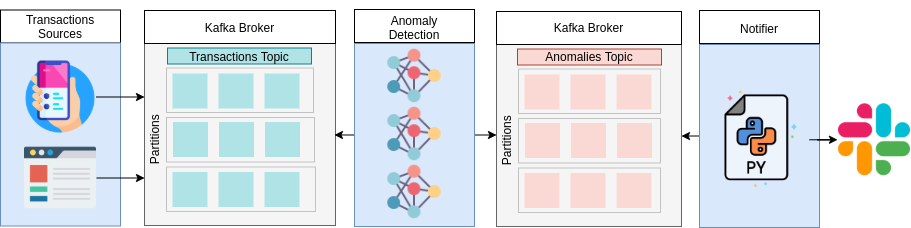
The decoupling between producer and consumer is a key advantage: you can add new consumers (a second model, an S3 writer, a Slack notifier) without touching the producer.
Apache Kafka Concepts
Before writing code, the fundamental building blocks of Kafka:
- Broker: the Kafka server that stores and delivers messages. In production there are several forming a cluster.
- Topic: a named message channel. Producers write to topics; consumers read from them.
- Partition: a topic is split into partitions that enable parallelism. Each message goes to one partition.
- Producer: a client that publishes messages to a topic.
- Consumer: a client that subscribes and reads messages from a topic.
- Consumer group: multiple consumers cooperate to process a topic in parallel; Kafka balances partitions among them.
- Offset: the position of a message within a partition. Consumers track the last read offset to resume without losing messages.
Setting Up Kafka with Docker Compose
The fastest way to get Kafka running locally is with Docker Compose using the Confluent Platform image:
# docker-compose.yml
version: "3.8"
services:
  zookeeper:
    image: confluentinc/cp-zookeeper:7.5.0
    environment:
      ZOOKEEPER_CLIENT_PORT: 2181
    ports:
      - "2181:2181"

  kafka:
    image: confluentinc/cp-kafka:7.5.0
    depends_on:
      - zookeeper
    ports:
      - "9092:9092"
    environment:
      KAFKA_BROKER_ID: 1
      KAFKA_ZOOKEEPER_CONNECT: zookeeper:2181
      KAFKA_ADVERTISED_LISTENERS: PLAINTEXT://localhost:9092
      KAFKA_OFFSETS_TOPIC_REPLICATION_FACTOR: 1
      KAFKA_AUTO_CREATE_TOPICS_ENABLE: "true"
Start the cluster:
docker-compose up -d
Install the Python dependencies:
pip install confluent-kafka scikit-learn numpy joblib
Training the Anomaly Detector
Isolation Forest is an unsupervised algorithm ideal for anomaly detection: it builds isolation trees and assigns anomaly scores (more negative = more anomalous). It doesn't need labeled anomaly examples to train.
This is the exact script from the repository, trained on synthetic 2D Gaussian data:
# model/train.py
import numpy as np
from joblib import dump
from sklearn.ensemble import IsolationForest

rng = np.random.RandomState(42)

# Generate training data: two Gaussian clusters (simulate normal transactions)
X = 0.3 * rng.randn(500, 2)
X_train = np.r_[X + 2, X - 2]   # 1000 total samples
X_train = np.round(X_train, 3)

# Train Isolation Forest
clf = IsolationForest(
    n_estimators=50,
    max_samples=500,
    random_state=rng,
    contamination=0.01  # expect ~1% anomalies
)
clf.fit(X_train)

# Persist the model
dump(clf, './isolation_forest.joblib')
print("Model saved to isolation_forest.joblib")
Run training first:
python model/train.py
Producer: Generating the Transaction Stream
The producer generates transactions in an infinite loop. Most observations are normal (two Gaussian clusters); with a configurable probability it generates anomalous observations (uniform values over a wide range) to exercise the detector.
# streaming/producer.py
import json
import random
import time
from datetime import datetime
import numpy as np
from confluent_kafka import Producer

TRANSACTIONS_TOPIC = "transactions"
OUTLIERS_PROB = 0.05   # 5% probability of anomaly
DELAY = 0.1            # seconds between messages

producer = Producer({"bootstrap.servers": "localhost:9092"})

_id = 0
print(f"Producer started. Sending to topic '{TRANSACTIONS_TOPIC}'...")

while True:
    # Generate normal or anomalous observation
    if random.random() <= OUTLIERS_PROB:
        # Anomaly: uniform values outside the normal range
        X_test = np.random.uniform(low=-4, high=4, size=(1, 2))
    else:
        # Normal: Gaussian cluster centered at +2 or -2
        X = 0.3 * np.random.randn(1, 2)
        X_test = X + np.random.choice(a=[2, -2], size=1, p=[0.5, 0.5])

    X_test = np.round(X_test, 3).tolist()
    current_time = datetime.utcnow().isoformat()
    record = {"id": _id, "data": X_test, "current_time": current_time}

    producer.produce(
        topic=TRANSACTIONS_TOPIC,
        value=json.dumps(record).encode("utf-8")
    )
    producer.flush()

    _id += 1
    time.sleep(DELAY)
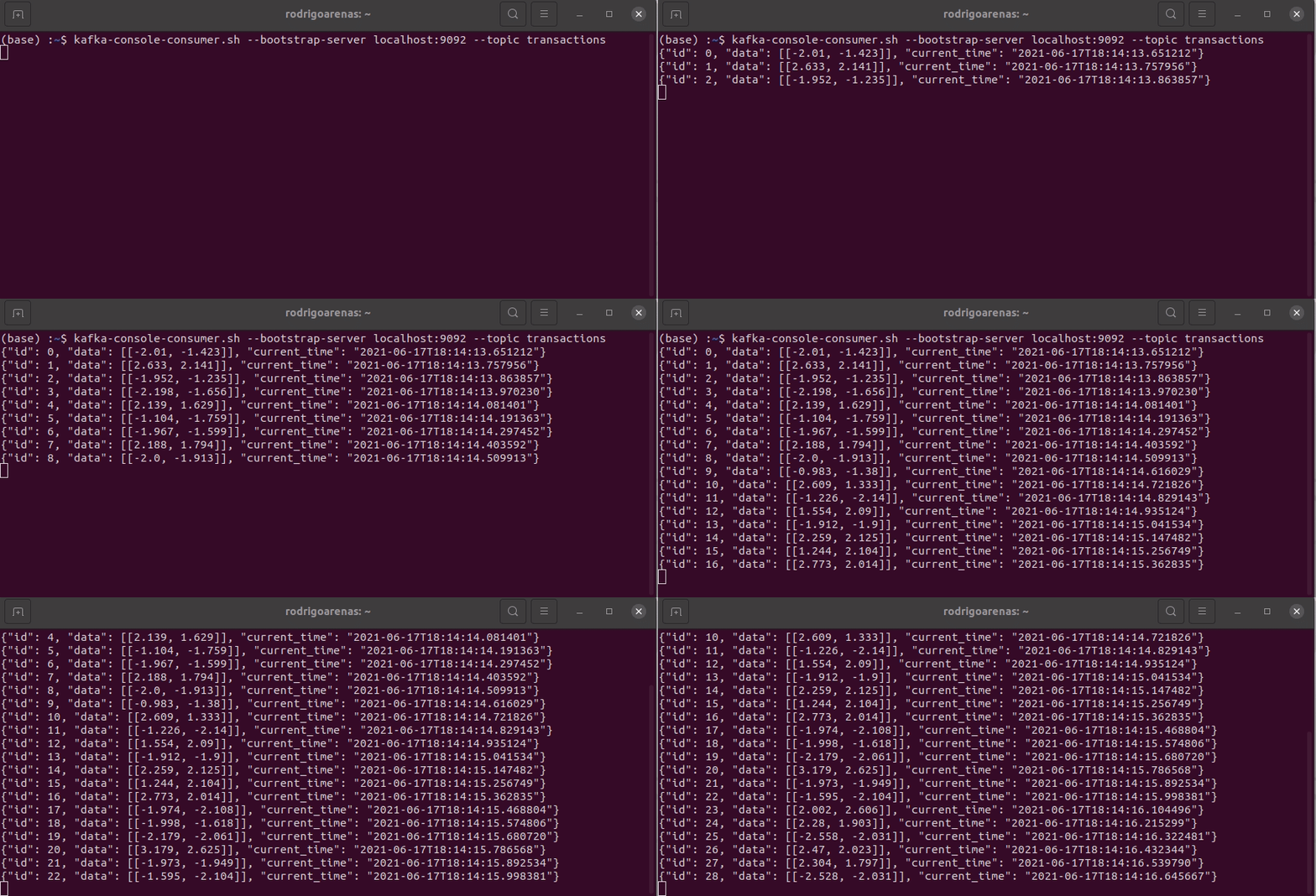
Consumer: Detecting Anomalies on the Fly
The consumer subscribes to the transactions topic, applies the model to each message, and publishes detected anomalies to a separate topic. For higher throughput, it launches one process per topic partition:
# streaming/anomalies_detector.py
import json
import os
import logging
from multiprocessing import Process

import numpy as np
from joblib import load
from confluent_kafka import Consumer, Producer

TRANSACTIONS_TOPIC = "transactions"
ANOMALIES_TOPIC = "anomalies"
NUM_PARTITIONS = 3

model_path = os.path.abspath("model/isolation_forest.joblib")


def detect():
    consumer = Consumer({
        "bootstrap.servers": "localhost:9092",
        "group.id": "anomaly-detector-group",
        "auto.offset.reset": "latest",
    })
    producer = Producer({"bootstrap.servers": "localhost:9092"})
    clf = load(model_path)

    consumer.subscribe([TRANSACTIONS_TOPIC])

    while True:
        message = consumer.poll(timeout=0.05)  # 50 ms

        if message is None:
            continue
        if message.error():
            logging.error("Consumer error: %s", message.error())
            continue

        record = json.loads(message.value().decode("utf-8"))
        data = record["data"]
        prediction = clf.predict(data)

        if prediction[0] == -1:
            score = clf.score_samples(data)
            record["score"] = np.round(score, 3).tolist()
            producer.produce(
                topic=ANOMALIES_TOPIC,
                value=json.dumps(record).encode("utf-8")
            )
            producer.flush()

    consumer.close()


# Launch one process per partition to process in parallel
if __name__ == "__main__":
    for _ in range(NUM_PARTITIONS):
        p = Process(target=detect)
        p.start()
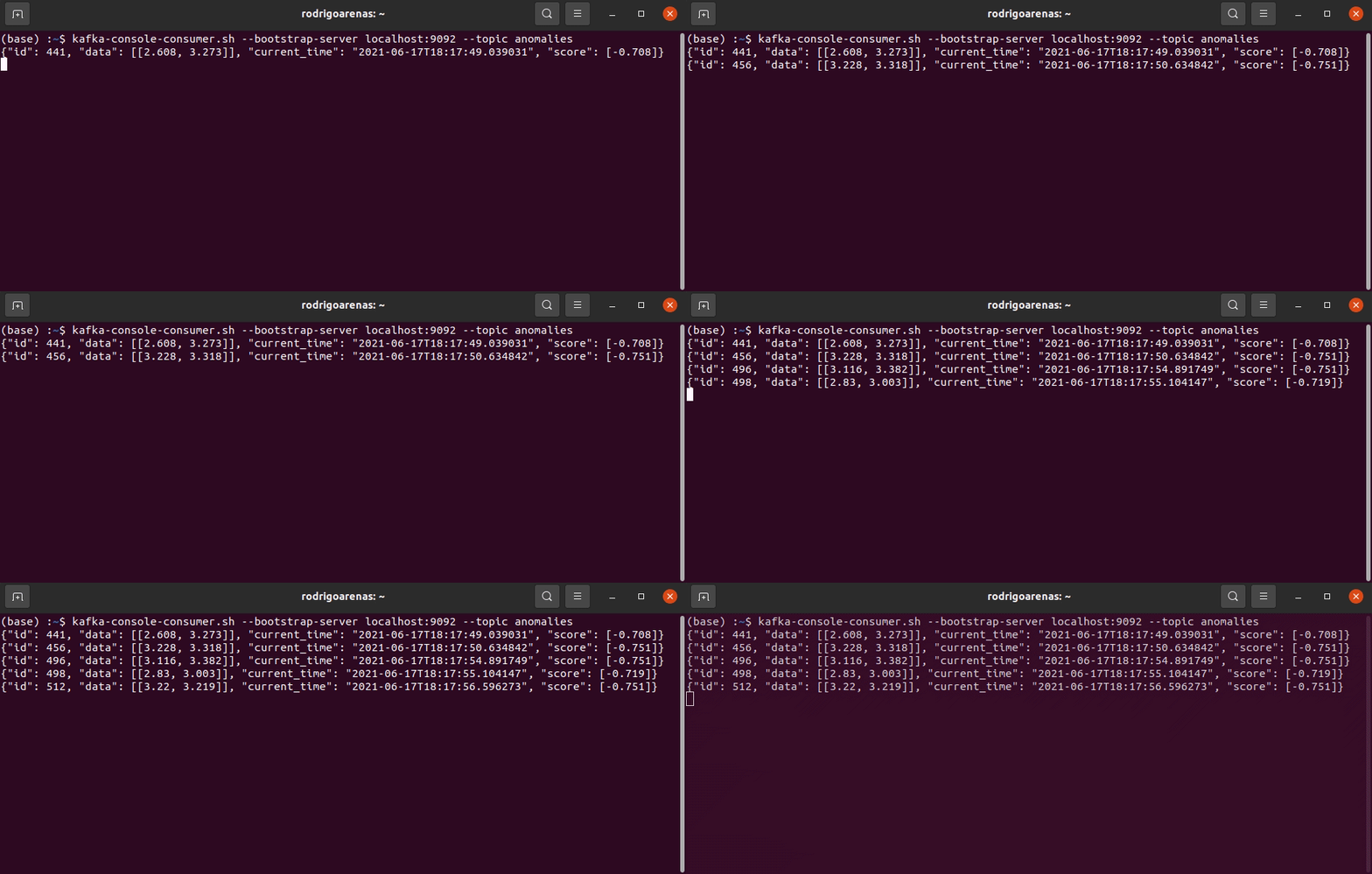
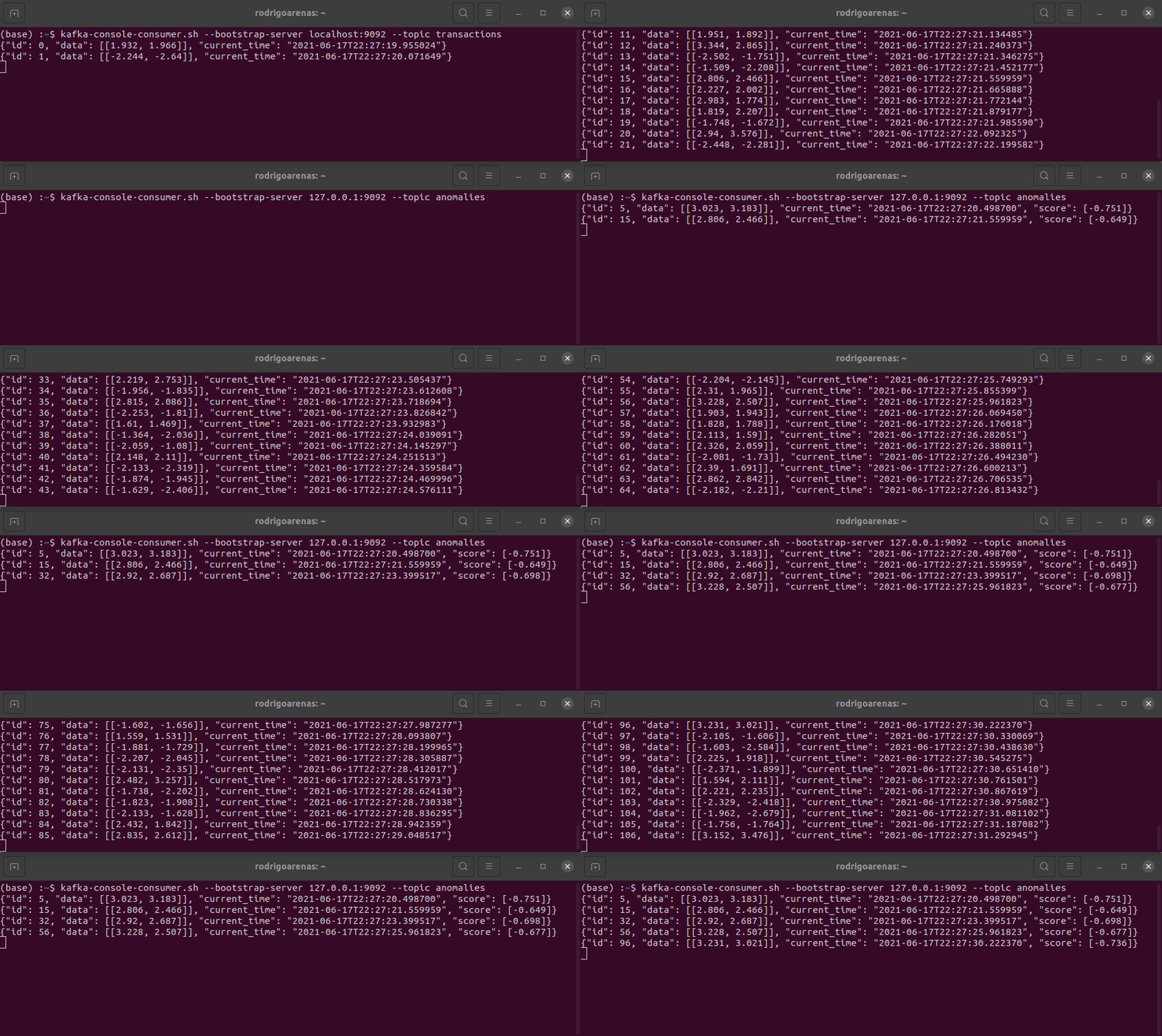
The system launches NUM_PARTITIONS processes in parallel, one per topic partition. Each process has its own consumer and shares the same consumer group (anomaly-detector-group), so Kafka automatically balances which partition each process reads.
Why Real-Time Detection Matters
Batch processing has an inherent cost: the time between when an event occurs and when you detect it. If your ML pipeline runs every hour, an anomaly could be causing damage for 59 minutes before you receive an alert. In critical systems — manufacturing, finance, IT infrastructure — that delay is unacceptable.
The streaming approach inverts the equation: instead of periodically pulling data to the model, the model waits for data to arrive and evaluates it immediately. It's the mirror image of the request-response pattern from serving an ML model with FastAPI and Docker: there, a client asks for a prediction; here, predictions happen as events flow in.
Running the Full System
# Terminal 1: start Kafka
docker-compose up -d

# Terminal 2: train the model
python model/train.py

# Terminal 3: start the detector (consumer)
python streaming/anomalies_detector.py

# Terminal 4: start the producer
python streaming/producer.py
The detector console will show the IDs of anomalous transactions and their scores. Messages flagged as anomalies remain in the anomalies topic, ready to be consumed by any other system (Slack, a database, a dashboard).
Production Extensions
With this baseline system working, the natural next steps are:
- External alerts: add a consumer of the
anomaliestopic that sends notifications to Slack, PagerDuty, or email. - Periodic retraining: maintain a sliding window of recent data and retrain the model to adapt to concept drift — see how to monitor ML models in production with Evidently to detect when drift is actually happening.
- More sophisticated models: LSTM Autoencoders for time series with seasonal patterns, or One-Class SVM for non-Gaussian distributions.
- Kafka Streams / Faust: for more complex stream processing logic (time windows, topic joins) consider a dedicated stream processing framework.
- Schema Registry: use Avro or Protobuf with Confluent Schema Registry to validate message schemas and evolve contracts between producer and consumer.
Conclusion
The combination of Apache Kafka and scikit-learn makes it possible to build real-time anomaly detection systems with relatively few lines of code. Kafka handles reliable, scalable event transport; the Isolation Forest model handles the detection. The decoupling between producer and consumer ensures you can scale, improve, or replace any part without affecting the others.
The complete code with Docker Compose, producer, consumer, and training scripts is on GitHub.
About the author
Rodrigo Arenas is a software architect and machine learning engineer in Medellín, Colombia. He builds products, platforms, and open-source software for AI, Data Engineering, and Machine Learning — creator of Ciaren, sklearn-genetic-opt, and PyWorkforce.
Recommended reading
Rodrigo Arenas — ML Engineer & Open Source Maintainer
Working on something similar? I can help you take it to production.