
Articles / LLMs & Agents
LLM Product Data Extraction: Validate Variants Before Import
Validate LLM-extracted product data in Python: bind fields to the right SKU, preserve missing prices and reject evidence copied from another variant.

The blue mug costs USD 24.90. The red one costs USD 19.90. An extractor returns a blue mug priced at USD 19.90, with valid JSON and a quote that really appears on the page. Every field looks plausible. The record is still wrong.
For product extraction, validate the variant before importing the fields. Bind the requested SKU to a captured source record, then check each value against evidence from that record. A schema catches malformed output; it cannot tell whether the price belongs to the blue mug.
This tutorial builds that check after an LLM response. It uses a synthetic catalog and a supplied candidate, so you can test the failure cases without an API key. For the model call itself, start with structured extraction using Python and Pydantic.
Decide what one record represents
A product family and an individual variant are different units of data. Shared copy may describe every mug, while a price or stock message belongs to one SKU. Schema.org's ProductGroup models a group whose products vary by properties such as color or size. That distinction is useful even when your destination is a CSV rather than structured markup.
| Source situation | Import decision | Mistake to avoid |
|---|---|---|
| Blue and red variants appear together | Select the expected SKU before validating fields | Taking the lowest price on the page |
Price is explicitly 0.00 | Accept only if that value has matching evidence | Treating zero as missing |
| Price is absent | Keep it unknown and send the record for review | Replacing it with zero |
| Price is in another currency or format | Use another explicit parsing profile | Guessing what a comma means |
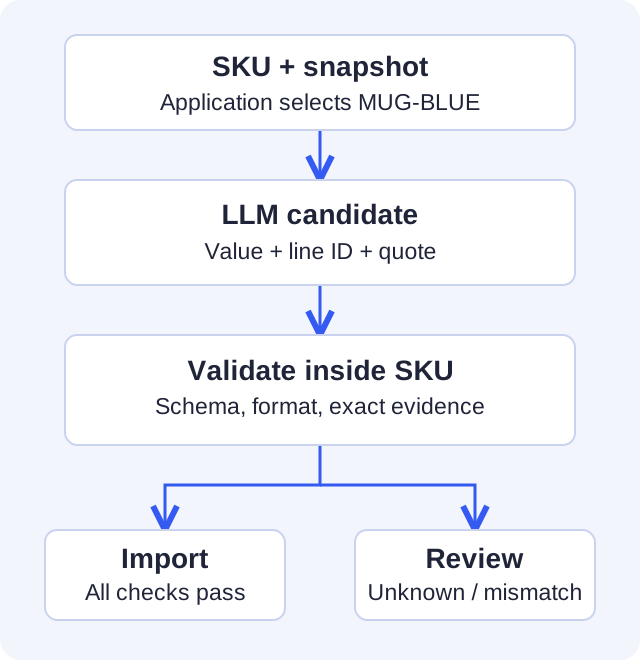
The application chooses expected_sku. The model does not choose its own validation target. In a real importer, retain the source URL, capture time and snapshot identifier with the job. This small example keeps only the captured lines; it does not implement a crawler, freshness checks or stock synchronization.
Require evidence, including an explicit unknown
Use Python 3.13 and Pydantic 2.13.4. Save the following three Python blocks, in order, as validate_product.py:
py -3.13 -m venv .venv
& .\.venv\Scripts\python.exe -m pip install pydantic==2.13.4
& .\.venv\Scripts\python.exe validate_product.py
import re
from pydantic import BaseModel, ConfigDict, Field, ValidationError


class Evidence(BaseModel):
    model_config = ConfigDict(strict=True, extra="forbid")
    value: str = Field(min_length=1, max_length=200)
    line_id: str = Field(min_length=1, max_length=40)
    quote: str = Field(min_length=1, max_length=240)


class ProductCandidate(BaseModel):
    model_config = ConfigDict(strict=True, extra="forbid")
    sku: str = Field(min_length=1, max_length=64)
    title: Evidence
    color: Evidence
    price: Evidence | None


class ReviewRequired(ValueError):
    pass
price must be present, but may be None. Omitting it is a schema failure; None means the extraction explicitly reported no price. Neither becomes zero. In Pydantic, a nullable annotation does not automatically supply a default. Field defaults.
All evidence values are strings. Strict mode rejects a numeric 24.90 where the contract requires text, while extra="forbid" catches unexpected keys. These are deliberately separate from the source checks below. Pydantic configuration.
Check inside the selected variant
The supported source format is intentionally narrow: three labeled lines, a USD price, a decimal point and exactly two decimal places. Values must match exactly; no fuzzy match or automatic currency conversion runs here.
def validate_product(payload: dict, expected_sku: str,
                     snapshot: dict[str, dict[str, str]]) -> dict[str, str]:
    candidate = ProductCandidate.model_validate(payload)
    if candidate.sku != expected_sku:
        raise ReviewRequired("Candidate belongs to another SKU")
    source = snapshot.get(expected_sku)
    if source is None:
        raise ReviewRequired("No captured source for the requested SKU")
    if candidate.price is None:
        raise ReviewRequired("Price is unknown; do not replace it with zero")
    if not re.fullmatch(r"(?:0|[1-9][0-9]{0,8})\.[0-9]{2}", candidate.price.value):
        raise ReviewRequired("Unsupported USD price format")

    for evidence, label in [
        (candidate.title, "Title"), (candidate.color, "Color"),
        (candidate.price, "Price: USD"),
    ]:
        separator = " " if label == "Price: USD" else ": "
        expected_line = f"{label}{separator}{evidence.value}"
        if (source.get(evidence.line_id) != evidence.quote
                or evidence.quote != expected_line):
            raise ReviewRequired(f"{label}: value is not supported by this SKU")

    return {
        "sku": expected_sku, "title": candidate.title.value,
        "color": candidate.color.value, "currency": "USD",
        "price": candidate.price.value,
    }
The quote must equal both the captured line and the expected label/value pair. A correct quote attached to an invented value fails. A correct price copied from another SKU also fails because only the selected record's lines are available to the check.
That is a consistency guarantee for this captured format. It does not establish that the merchant's page was correct, the capture selected the right variant, or the price remains current. Those are upstream and operational responsibilities.
Try the valid record, then swap its price
These are synthetic fixtures, not measured model outputs:
SNAPSHOT = {
    "MUG-BLUE": {"l1": "Title: Travel mug", "l2": "Color: Blue",
                 "l3": "Price: USD 24.90"},
    "MUG-RED": {"l1": "Title: Travel mug", "l2": "Color: Red",
                "l3": "Price: USD 19.90"},
}
CANDIDATE = {
    "sku": "MUG-BLUE",
    "title": {"value": "Travel mug", "line_id": "l1", "quote": "Title: Travel mug"},
    "color": {"value": "Blue", "line_id": "l2", "quote": "Color: Blue"},
    "price": {"value": "24.90", "line_id": "l3", "quote": "Price: USD 24.90"},
}
print(validate_product(CANDIDATE, "MUG-BLUE", SNAPSHOT))

mixed_variant = {**CANDIDATE, "price": {
    "value": "19.90", "line_id": "l3", "quote": "Price: USD 19.90",
}}
try:
    validate_product(mixed_variant, "MUG-BLUE", SNAPSHOT)
except ReviewRequired as error:
    print("Review:", error)
The first call returns the blue mug at 24.90. The second prints a review reason. The function never writes to a catalog: the caller handles ValidationError and ReviewRequired as separate outcomes and imports only a successful return. Keep the snapshot independent of the candidate; accepting source lines supplied by the same model would remove this check's value.
Connect the model without weakening the gate
Give the extractor the selected SKU's lines, the schema and a short instruction: return quoted evidence; use null for an unavailable price; do not borrow values from another variant. Treat source text as data, including any instructions embedded in it. A prompt is guidance, while the Python gate enforces this example's import contract.
Before expanding the format, label a small set of real, permitted source snapshots. Track wrong-variant rate, field accuracy and the share sent for review separately. Include unavailable prices and changed variants; a collection of clean pages tells you little about those failures. No accuracy percentage is implied by the fixtures here.
For monetary totals and reconciliation, use the separate invoice validation example. If an uncertain record needs a person to decide, pause the workflow with LangGraph before importing it.
Are you building an AI or data platform?
If you need to adapt this approach to your system, tell me about your data and the technical decision you need to resolve.